Table of Content:
- Problem Statement
- Salesforce SSO Options
- Choosing a Tool – Other options considered
- Building it Out
- Security
- Final Thoughts
Problem Statement:
The issue is tied to Salesforce and the way it treats Delegated Authentication. As a background; Salesforce has 2 ways to handle Single Sign on –
- Delegated Authentication; which uses a call to a Web Service &
- Federated Authentication; with uses an industry standard SAML flow
For most applications – Federated (SAML) is the way to go. It is well supported by Salesforce and has an excellent User Experience.
Unfortunately, Federated was not an option for this particular client. The issue was that the orgs in question were Veeva CRM Orgs with heavy usagle of the Veeva offline App. Veeva CRM only supports Delegated Authentication for it’s users. (the reason is tied to the syncing of the offline app which is not a SAML flow)

The Problem with Delegated Authentication:
Delegated Authentication is one of those features which does not get a lot of love from Salesforce. Salesforce provides us with a WSDL with the expectation that the Authentication Provider would create a SOAP Web Service with the following the WSDL EXACTLY. There are other issues, including a lack of flexibility in the configuration which limits the ability to set up authentication (more on that later)
The Web Service itself is not that complicated. It accepts inputs of Username, Password and Source IP Address and returns a simple True/False based on whether the credentials are valid.
The issue is the Username part of the request. It absolutely HAS to be the Username in the Request and it is not configurable. As everybody who has administered a Salesforce org knows, the Username has to be unique across ALL Orgs meaning – if we intend to have SSO – the same user cannot exist in multiple Orgs.
Sample Request
<?xml version="1.0" encoding="UTF-8" ?>
<soapenv:Envelope
   xmlns:soapenv="http://schemas.xmlsoap.org/soap/envelope/">
   <soapenv:Body>
      <Authenticate xmlns="urn:authentication.soap.sforce.com">
         <username>username@user.com</username>
         <password>aPassword</password>
         <sourceIp>1.2.3.4</sourceIp>
      </Authenticate>
   </soapenv:Body>
</soapenv:Envelope>
Sample Response
<?xml version="1.0" encoding="UTF-8"?>
<soapenv:Envelope
   xmlns:soapenv="http://schemas.xmlsoap.org/soap/envelope/">
   <soapenv:Body>
      <AuthenticateResult xmlns="urn:authentication.soap.sforce.com">
         <Authenticated>false</Authenticated>
      </AuthenticateResult>
   </soapenv:Body>
</soapenv:Envelope>
NOTE: This is ONLY a problem for Delegated Authentication. Federated Authentication provides you with the option of sending a different user attribute called the Federation Id to the External Auth Provider
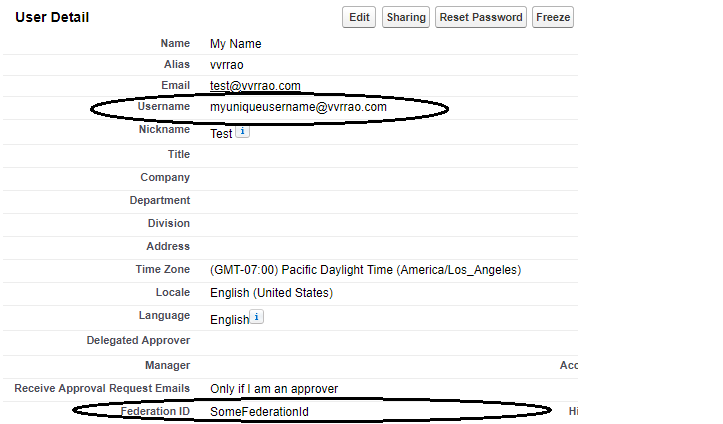
In most cases, I would recommend using Federated Authentication for the SSO needs. However, we were stuck with Delegated SSO to accommodate our partners from Veeva necessitating inventing a solution.
The Solution – Choosing a tool

Naturally, there are multiple ways to handle the issue. Modifying the Authorization Provider was out of the question. Here is what I considered;
Hosting a wrapper on Salesforce:
Theoretically possible. Usually, REST or SOAP Services hosted on Salesforce require some sort of Authentication to access. (either oAuth or Username/Password).
This can be bypassed by exposing the service using Sites.com. Unfortunately, licenses were not available for this particular client.
Another issue is that Salesforce does not provide a way to create a Top Down Webservice from a provided WSDL. (i.e. we cannot import a WSDL and create the code to match the contract). We can get a reasonable approximation using Apex but we have no control on the Namespaces within the WSDL. Again, we can get a workaround by exposing a REST Service, accepting a POST and ignoring validation.
Ultimately, the lack of licences made this a non-option
Hosting on Heroku:
Heroku made the most sense architecturally. However, there was not a lot of expertise in this client on Heroku. On the other hand, the client had deep expertise in AWS with several applications leveraging Lambda and API Gateway. This would make maintenance and future support straightforward. This finally cliched the deal. That being said, a more complex implementation might have clinched the deal for Heroku.
So we chose to use AWS as our solution. A simple AWS Lambda function exposed via the API Gateway seemed like the simplest solution
The Solution – Building it out
Needless to say, the below assumes you already have a SOAP Service on a 3rd party Authenticator and SSO is enabled on your Salesforce Org.
At first Glance, it seems like the API Gateway does not support SOAP Webservices – try to create an API entry and you will not get the following options
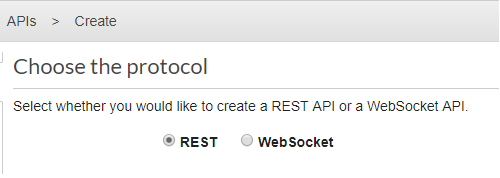
Not a problem. Creating a API with the REST Protocol works just as well. We will need to configure it to accept POST messages. The drawback to this is that this is not a real SOAP Service meaning that doing things like querying the URL for the WSDL will get you nothing back.
Also, AWS will expect inputs to be in JSON by default. We will work around that.
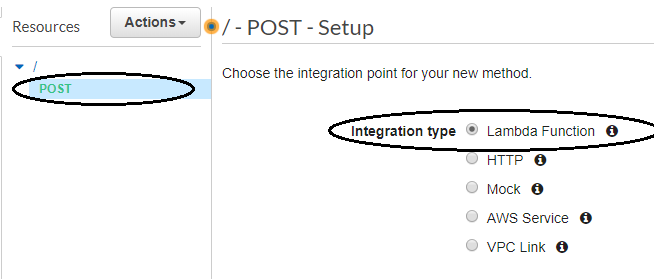
Of course, you need to create the Lambda function first. I kept it simple. This is what it looks like using Python 3.7
import json
from botocore.vendored import requests
def lambda_handler(event, context):
    #create the Request
    url = "INSERT THE URL OF YOUR AUTHENTICATION PROVIDER HERE"
    headers = {'content-type': 'text/xml', 'SOAPAction':'AuthenticationService'}
    temp_body = event["body"]
    out_body = temp_body.replace('.app2','')

    #call The Auth Provider
    response = requests.post(url,data=out_body,headers=headers)

    return {
        'statusCode': 200,
        'body': response.text
     }
IMPORTANT NOTE: First things first, notice the ‘from botocore.vendored import requests‘? That is a BIG NO NO!! Boto is an excellent package but ‘requests‘ has been deprecated and was never meant to be used for public consumption. This works great for a POC but I would encourage you to create your own package with the appropriate dependencies in it in a final version. Keeping the code as is means that any future updates to Boto which removes ‘requests‘ would cause the code to break.
Also note the return in JSON, this will be handled in the API Gateway config.
Handling the Request and Response Body and Headers
Remember, the API Gateway thinks it is handling a REST API. In reality, the request from Salesforce will be a text/xml. It will be up to you to configure the handling of the Request body.
Also, the Soap Action Header must be passed to the Authentication Web Service for the call to work.
These can be handled in the Method Request/Response and Integration Request/Response config.
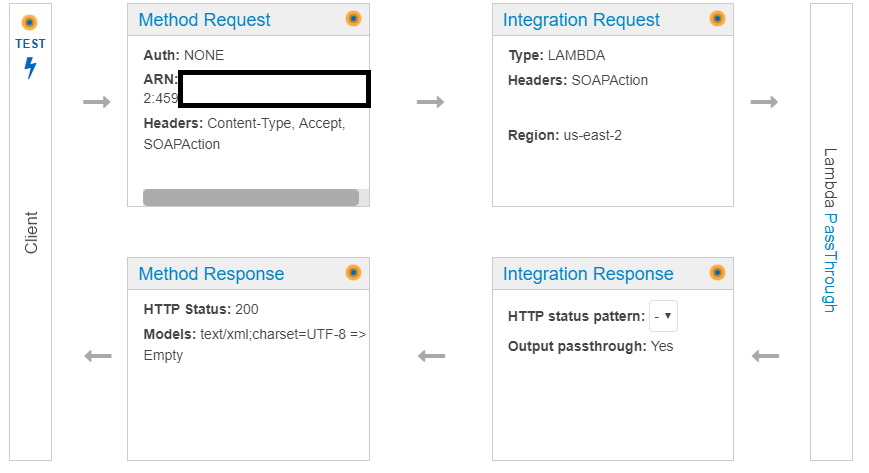
Handling the Header:
You need to ensure that the SOAP Action Header is captured and passed through to your function. can be done by configuring the Method Request to accept the incoming headers;
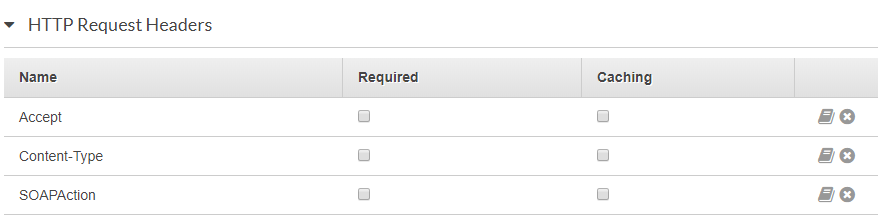
and passing them on to Lambda in the Integration Request (note I ignored the other headers)

Handling the Request Body
We are going to ensure that our API can handle a HTTPS request with a body of text/xml. (to be safe, I included application/xml in this Salesforce will invoke the API using text/xml)
This needs to be added to the Method request:

and needs a corresponding mapping template in the Integration Request:

{
 "content-type" : "$input.params('Content-Type')",
 "date" : "$input.params('X-Amz-Date')",
 "api-key" : "$input.params('x-api-key')",
 "auth" : "$input.params('Authorization')",
 "body" : $input.json('$')
 }
The above ensures that our SOAP Request, sent to our API is correctly translated into the event[“body”] of our Lambda code
Handling the Response Body
At this point, we have been able to set up our code to accept a SOAP Request and send it on to our Authenticator. We now need to convert to response back to text/xml to ensure Salesforce gets the response in the way it expects.
Remember, our Lambda returned a response in a JSON format:
return {
        'statusCode': 200,
        'body': response.text
     }
We need to add a corresponding Mapping template to transform this back to text/xml:

#set($inputRoot = $input.path('$'))
$inputRoot.body
And finally, add the content type in the Method Response to send this back to Salesforce.

The above, is an example for response code 200 (Success). You will need to modify the Lambda as well as the API Gateway config to handle other error codes.
Configuring Salesforce to call the API Gateway
Deploy the above. You would need to do the following in Salesforce;
- Whitelist the API Endpoint. (Setup->Security->Remote Site Settings) which would allow a call to the endpoint from Salesforce
- Configure your endpoint in (Setup->Single Signon Settings)

Notice in the above, we have both Delegated SSO as well as Federated SSO set up. They can co exist in the org. Delegated SSO gets triggered when you hit the https;//login.salesforce.com URL. Federated SSO is invoked by going to the custom domain set up for your org.
The final step is to set up a permission of the users who need to be Authenticated via Delegated SSO. This can be done on the Profile or via a Permission set (prefered). The permission is called Is Single Sign-On Enabled
Securing the API
The final step is securing the API. Once again, the lack of flexibility on the Salesforce end is an issue.
Traditionally, we would secure the endpoint via a mutual SSL Certificate (generate a cert from Salesforce, sign it via a CA/self sign it and upload it to the endpoint).
Unfortunately, the API Gateway does not support importing a 3rd party client certificate. It does support OAuth flows using Lambda Authorizers and API keys but Salesforce doesn’t have a way to configure the Delegated SSO callout to incorporate these.
The API Gateway does offer tools to throttle calls and IP range restrictions which are of some help but are not a perfect solution.
I would strongly recommend using AWS WAF to secure the API. It would protect against things like DDoS attacks and code injection. The details would be a much larger conversation.
Summary and Final Thoughts
I hope the above has been useful to you. Please to reach out in the comments section with any questions. If you have Delegated Authentication in your Salesforce Org and need to configure SSO on multiple orgs, I would strongly recommend using Federated if it is possible. If it is not an option, (as it was for this case), I hope the above will help you along.
Interestingly, Veeva has announced that they will support oAuth 2.0 authentication against an MDM for Veeva CRM apps with Release 19R3. If that works, it would bring Veeva in line with other Mobile apps and a solution such as this may no longer be needed
 Venkat's Playspace